

The Mega Menu: A False Good Idea for the UX of Your Site? Pay attention to cognitive load!
A well-designed website is one where the user navigates with ease, quickly finds what they are looking for, and accomplishes their goals without friction. However, in the quest for comprehensiveness, some practices may prove to be counterproductive.
The mega menu, often perceived as a miracle solution to explain the extent of an offer, can in reality become a real headache for your visitors and cause their cognitive load to skyrocket. Is it still relevant, especially for e-commerce sites with a limited catalog? Let's dive into the heart of this UX problem.
What is cognitive load in UX?
Before we demonize the mega menu, let's understand what the cognitive load. In cognitive psychology, this term refers to the total amount of mental effort mobilized into working memory at a given time. Applied to UX (user experience), cognitive load represents the effort that a user must make to interact with an interface, understand the information presented and make decisions.
Too much cognitive load can lead to:
- Frustration and confusion
- Difficulty making decisions
- Increased error rate
- Abandonment of browsing or buying
The goal of any UX designer is therefore to minimize superfluous cognitive load to make the experience as fluid and intuitive as possible.
The mega menu: the illusion of clarity?
A mega menu is a type of extended drop-down menu, displaying multiple navigation options spread over several columns, often enriched with icons or images. On paper, the idea is attractive: to present a maximum of choices from the first level to guide the user.
However, this wealth of options can quickly turn into information overload. Faced with a wall of links, the user may feel overwhelmed, paralyzed by the “paradox of choice”: the more options there are, the more difficult the decision becomes.
Why the mega menu can increase cognitive load
- Complex analysis: A large number of options require a longer analysis time. The user has to scan, read, compare, which places a lot of stress on his working memory.
- Difficulty in prioritizing: Without an impeccable visual and semantic organization, it becomes difficult to distinguish the main categories from the subcategories, or to understand the logic of grouping.
- Less suitable for mobile: Although adaptations exist, displaying a mega menu on a small screen remains a major challenge, often leading to compromised interfaces or laborious navigation.
- Dilution of attention: By wanting to show everything, you risk not really showcasing anything. Important options can drown out in the crowd.
The critical case of small catalogs: the trap of over-optimization
If your e-commerce site, whether developed on Shopify or another platform, only offers a few dozen or a hundred products, the use of a mega menu is often a Wrong good idea. Why?
- Vacuum printing: A “stretched” mega menu for a small number of categories can give the impression of emptiness or artificial complexity.
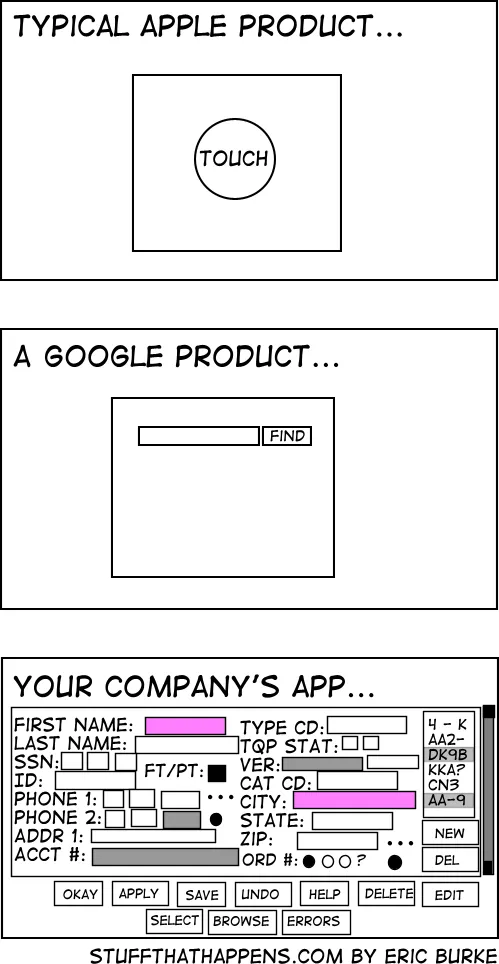
- Unnecessarily complex navigation: Simple options such as a classic pull-down menu, well-thought-out filters or an effective search bar are often much more suitable and direct for a intuitive navigation on a small catalog.
- Focus on simplicity: Users appreciate the simplicity and speed. An oversized menu for limited content goes against these expectations.
THEoptimizing the menu of your website does not necessarily mean “bigger is better.” It means “the more relevant and easier it is to use, the better.”
Alternatives and best practices for lightweight navigation
So how do you avoid information overload and offer a browsing user experience optimal, especially with a modest catalog?
1. Simplify the information hierarchy
- Fewer levels: Limit the number of main categories. Consider the rule of “7 plus or minus 2" options so as not to overload short-term memory.
- User logic: Organize your categories according to the logic of your customers, not that of your business. Tools like card sorting can help you do this.
2. Opt for simple and targeted pull-down menus
For most sites, especially those with a limited product catalog, a standard dropdown menu by category is more than enough. It guides the user step-by-step without overwhelming them.
3. Value the search function
A powerful and visible search bar is a major asset. Many users know what they want and prefer to type their query rather than navigate through menus. Make sure your internal search engine is fast, error-tolerant, and offers relevant suggestions.
4. Explore circle menus carefully
A less conventional but sometimes explored alternative is the circular menu. This type of menu shows navigation options arranged in a circle, often around a central button. While they can offer a modern aesthetic and be engaging on touch interfaces, their use must be carefully considered:
- Potential benefits: Can be initially compact and offer fun interaction. Adapted for a very limited number of main options (typically 3 to 6).
- Disadvantages and cognitive load:
- Discoverability: If poorly designed, the options may not be all visible at once, requiring interaction to reveal them, which can increase the effort.
- Scalability: They quickly become cluttered and confused if the number of options increases.
- Convention: Less familiar for users who are used to linear navigation, which can lead to a slight learning curve.
- Relevance for catalogs: Generally unsuitable for navigating complex product structures or catalogs, even small ones, as they lack a clear hierarchy for subcategories.
- Discoverability: If poorly designed, the options may not be all visible at once, requiring interaction to reveal them, which can increase the effort.
The circular menu can be an option for specific applications or very clean interfaces with few navigation branches, but it is rarely the optimal choice for an e-commerce site looking to minimize the cognitive load and to maximize the efficiency of navigation.

5. Use filters and facets intelligently
On category pages or search results pages, clear and relevant filters (size, color, price, type, etc.) are much more effective in refining the selection than a mega menu trying to anticipate all needs.
6. Think “Mobile First”
Design your navigation with the mobile experience in mind first. The constraints of the small screen force conciseness and clarity, principles that also benefit the computer experience. Solutions like a well-structured “hamburger” menu are often preferable. If you are considering a redesign or the creation of your site, platforms like Webflow offer great flexibility to create thoughtful responsive experiences.
7. Test, analyze, iterate
UX is not an exact science. What works for one site may not work for another. Set up user tests, analyze navigation data (heatmaps, menu click rates, user journeys) and be ready to iterate to continuously improve the ergonomics of your site.
When can a mega menu be relevant?
It would be unfair to throw the mega menu into the trash once and for all. It can be a viable, and even recommended, solution for:
- The very big e-commerce sites with thousands of references and many distinct categories (ex: Amazon, La Redoute).
- Very rich content sites (media, major institutions) where the breadth of the subjects warrants an overall view.
- Platforms with very diverse audiences Needing Clearly Separated Entry Points
Even in these cases, careful design, clear visual prioritization, and long-term user testing are essential to avoid falling into the trap of UX cognitive load excessive.
Conclusion: simplicity at the service of the user and your conversions
When it comes to web browsing, the quest for comprehensiveness via a mega menu can often come at the expense of clarity and efficiency, especially for sites with limited product catalogs. One UX cognitive load Too high is a direct barrier to commitment and conversion.
Always focus on simplicity, relevance, and intuitiveness. A well-thought-out navigation structure, clear menus, efficient search and smart filters will be your best allies in guiding your users to what they are looking for, without losing them along the way.
At Axome, we believe that a great user experience is the key to online success. If you want to audit the ergonomics of your site, optimize your customer journeys or design an interface that minimizes cognitive load to maximize your results, our UX/UI experts are at your disposal.